Cross mark or X mark (✘,☒,⨂) symbol in LaTeX
 By Parvez Akhtar Pasha
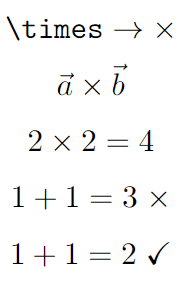
In LaTeX, there is a default command $\times$ to get an X-mark or cross-mark symbol in the document. But this command works only in math mode. Generally, this command can be used for cross product.
\documentclass{article}
\usepackage{amssymb}
\begin{document}

  $$ \verb|\times| \rightarrow \times $$
  $$ \vec{a} \times \vec{b} $$
  $$ 2 \times 2 = 4 $$
  $$ 1 + 1 = 3 \; \times $$
  $$ 1 + 1 = 2 \; \checkmark $$

\end{document}
Output:
Other styles of X mark symbol
Multiple packages provide commands to get different styles of cross-mark symbols in LaTeX. I listed all.
| Package | Command | Output |
|---|---|---|
bbding |
\XSolid |
 |
bbding |
\XSolidBold |
 |
pifont |
\ding{53} |
 |
pifont |
\ding{55} |
 |
pifont |
\ding{54} |
 |
pifont |
\ding{56} |
 |
arev |
$\ballotx$ |
 |
utfsym |
\usym{2718} |
 |
utfsym |
\usym{2715} |
 |
utfsym |
\usym{2613} |
 |
utfsym |
\usym{2717} |
 |
fontawesome |
\faTimes |
 |
X-Box or crossed box symbol in LaTeX
For the x-box or crossed-box symbol, we have different packages for different styles. Follow the table given below.
| Package | Command | Output |
|---|---|---|
wasysym |
\XBox |
 |
marvosym |
\CrossedBox |
 |
utfsym |
\usym{2612} |
 |
utfsym |
\usym{1F5F5} |
 |
fontawesome |
\faTimesCircle |
 |
fontawesome |
\faTimesCircleO |
 |
Leave a Reply