How to add clickable links (Hyperlinks) in LaTeX?
 By Parvez Akhtar Pasha
In this tutorial, you will learn how to add clickable links in LaTeX. Hyperlinks to any website or email address in your LaTeX document.
Adding links in your LaTeX document can be done by any url or hyperref package. But with the url package, you can’t add a clickable link in the document.
Add not clickable links with url package
First of all, you have to load the package with \usepackage{url} in the preamble of your document. Now you can use the \url{<url or email>} command to add not clickable links in your document.
\documentclass{article}
\usepackage{url}
\begin{document}

  This is a website URL: \url{https://www.codespeedy.com/}

  This is an email ID: \url{contact@codespeedy.com}

\end{document}
Output:

Add clickable links with hyperref package
With the hyperref package you add clickable links in documents also you can customize the appearance of the link. Add this in the preamble: \usepackage{hyperref}.
To add a link with a description you can use the \href{<link>}{<des>} command.
And if you want to add the URL without any description then you can use the \url{<link>} command.
\documentclass{article}
\usepackage{hyperref}
\begin{document}

  This is a website URL with a description: \href{https://www.codespeedy.com/}{CodeSpeedy}

  URL without any description: \url{https://www.codespeedy.com/}

\end{document}
Output:

I know you’re thinking an annoying border appears around the link, but don’t worry it won’t show up in the printed document. It can only be seen on a computer.
But if you don’t want to see this border on the computer then you can use the [hidelinks] option with hyperref package. Like this:
\usepackage[hidelinks]{hyperref}
\documentclass{article}
\usepackage[hidelinks]{hyperref}
\begin{document}
\begin{center}
    \textbf{Clickable links}
\end{center}

  This is a website URL with a description: \href{https://www.codespeedy.com/}{CodeSpeedy}

  URL without any description: \url{https://www.codespeedy.com/}

\end{document}
Output:

Add clickable emails with hyperref package
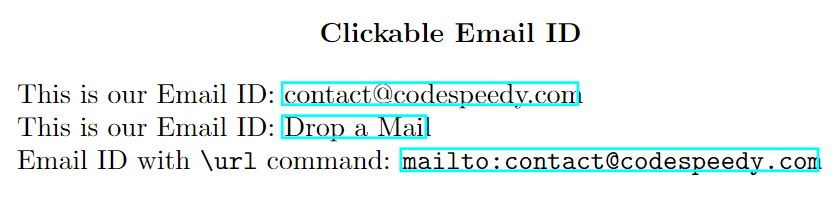
In order to add a clickable email ID in the document you can use this command:
\href{mailto:<Email-ID>}{<Email-ID>}
Take a look.
\documentclass{article}
\usepackage{hyperref}
\begin{document}
\begin{center}
    \textbf{Clickable Email ID}
\end{center}

  This is our Email ID: \href{mailto:contact@codespeedy.com}{contact@codespeedy.com}

  This is our Email ID: \href{mailto:contact@codespeedy.com}{Drop a Mail}

  Email ID with \verb|\url| command: \url{mailto:contact@codespeedy.com}

\end{document}
Output:
Customize the appearance of clickable links
The hyperref package provides a lot of options to customize the appearance of the link. Also, this package provides a command \hyperref to make clickable links (internal links) to jump to sections, subsections, figures, tables, or anything using the \label you have set.
To know more about the hyperref package, you can read the documentation.
| Option | Description | Default Value |
|---|---|---|
colorlinks |
Enables colored links instead of the default boxes around links. | false |
linkcolor |
Color for internal links (sections, pages, table, etc.). | red |
citecolor |
Color for citations. | green |
urlcolor |
Color for URLs. | magenta |
filecolor |
Color for file links. | cyan |
linktoc |
Determines how internal links in the table of contents are treated. | section |
breaklinks |
Allows links to be broken across lines. | false |
pdfborder |
Style of box around links. | 0 0 1 |
hidelinks |
Hide links (remove color and border formatting). | false |
pdftitle |
Title of the PDF document. | None |
pdfauthor |
Author of the PDF document. | None |
pdfsubject |
Subject of the PDF document. | None |
pdfkeywords |
Keywords for the PDF document. | None |
pdfstartview |
Initial view of the PDF when opened. | Fit |
pdfpagelayout |
Layout of the PDF pages. | SinglePage |
pdfpagemode |
Initial viewing mode of the PDF. | UseNone |
pdfdisplaydoctitle |
Display document title instead of file name in the window title. | false |
plainpages |
Avoids multiple links to the same destination by making the page numbers unique. | false |
unicode |
Allows characters to be Unicode-encoded in the PDF. | true |
bookmarks |
Enables or disables PDF bookmarks. | true |
bookmarksopen |
Specifies whether bookmarks should be expanded when the document is opened. | false |
bookmarksnumbered |
Numbers the bookmarks. | false |
hypertexnames |
Makes the anchor names unique in the PDF. | true |
pdfencoding |
Sets the encoding for bookmarks and the information strings. | unicode |
psdextra |
Additional options for the psdextra driver. |
None |
pdfauthor |
Author name for the PDF metadata. | None |
pdfcreator |
Creator name for the PDF metadata. | LaTeX with hyperref |
pdfproducer |
Producer name for the PDF metadata. | pdfTeX |
pdfkeywords |
Keywords for the PDF metadata. | None |
pdfstartview |
Initial view of the PDF. | None |
pdfpagelayout |
Page layout for the PDF. | None |
pdfpagemode |
Initial page mode for the PDF. | None |
pdfdisplaydoctitle |
Display document title instead of file name in the window title. | None |
\documentclass{article}
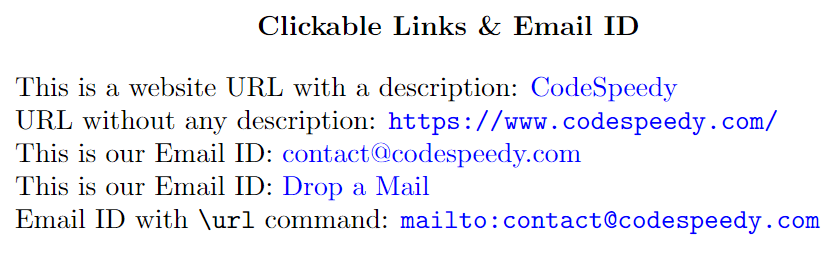
\usepackage[colorlinks=true, linkcolor=blue, urlcolor=blue]{hyperref}

\begin{document}
\begin{center}
    \textbf{Clickable Links \& Email ID}
\end{center}

  This is a website URL with a description: \href{https://www.codespeedy.com/}{CodeSpeedy}

  URL without any description: \url{https://www.codespeedy.com/}

  This is our Email ID: \href{mailto:contact@codespeedy.com}{contact@codespeedy.com}

  This is our Email ID: \href{mailto:contact@codespeedy.com}{Drop a Mail}

  Email ID with \verb|\url| command: \url{mailto:contact@codespeedy.com}

\end{document}
Output:
Leave a Reply