Loan Calculator in Python using Tkinter
 By Sarbajit De
Here we are going to discuss creating a loan calculator in Python using Tkinter. Before moving in further let’s first understand what is Tkinter. Tkinter is a standard yet powerful GUI library in Python.
GUI means ‘ Graphic User Interface’ which provides a link between the user and the code running in the background. So how does it help? Tkinter provides a strong object-oriented interface that helps to create a user interface.
Python program to create loan calculator
from tkinter import *
class LoanCalculator:

  def __init__(self):

    window = Tk()
    window.title("Loan Calculator")

    Label(window, text = "Annual Interest Rate").grid(row = 1,
                    column = 1, sticky = W)
    Label(window, text = "Number of Years").grid(row = 2,
                  column = 1, sticky = W)
    Label(window, text = "Loan Amount").grid(row = 3,
                column = 1, sticky = W)
    Label(window, text = "Monthly Payment").grid(row = 4,
                  column = 1, sticky = W)
    Label(window, text = "Total Payment").grid(row = 5,
                  column = 1, sticky = W)


    self.annualInterestRateVar = StringVar()
    Entry(window, textvariable = self.annualInterestRateVar,
          justify = RIGHT).grid(row = 1, column = 2)
    self.numberOfYearsVar = StringVar()

    Entry(window, textvariable = self.numberOfYearsVar,
        justify = RIGHT).grid(row = 2, column = 2)
    self.loanAmountVar = StringVar()

    Entry(window, textvariable = self.loanAmountVar,
      justify = RIGHT).grid(row = 3, column = 2)
    self.monthlyPaymentVar = StringVar()
    lblMonthlyPayment = Label(window, textvariable =
            self.monthlyPaymentVar).grid(row = 4,
            column = 2, sticky = E)

    self.totalPaymentVar = StringVar()
    lblTotalPayment = Label(window, textvariable =
          self.totalPaymentVar).grid(row = 5,
          column = 2, sticky = E)


    btComputePayment = Button(window, text = "Compute Payment",
                command = self.computePayment).grid(
                row = 6, column = 2, sticky = E)
    window.mainloop()


  def computePayment(self):

    monthlyPayment = self.getMonthlyPayment(
    float(self.loanAmountVar.get()),
    float(self.annualInterestRateVar.get()) / 1200,
    int(self.numberOfYearsVar.get()))

    self.monthlyPaymentVar.set(format(monthlyPayment, '10.2f'))
    totalPayment = float(self.monthlyPaymentVar.get())* int(self.numberOfYearsVar.get())

    self.totalPaymentVar.set(format(totalPayment, '10.2f'))

  def getMonthlyPayment(self, loanAmount, monthlyInterestRate, numberOfYears):
    monthlyPayment = loanAmount * monthlyInterestRate / (1 - (1 / (1 + monthlyInterestRate) ** (numberOfYears * 12)))
    return (monthlyPayment)
    r = Tk()


LoanCalculator()
Let us understand how the code works:
The first step is to import all the libraries and the modules as per requirement.
Next, we create a class named as LoanCalculator
- This class has a constructor and two methods namely computePayment and getMonthPayment
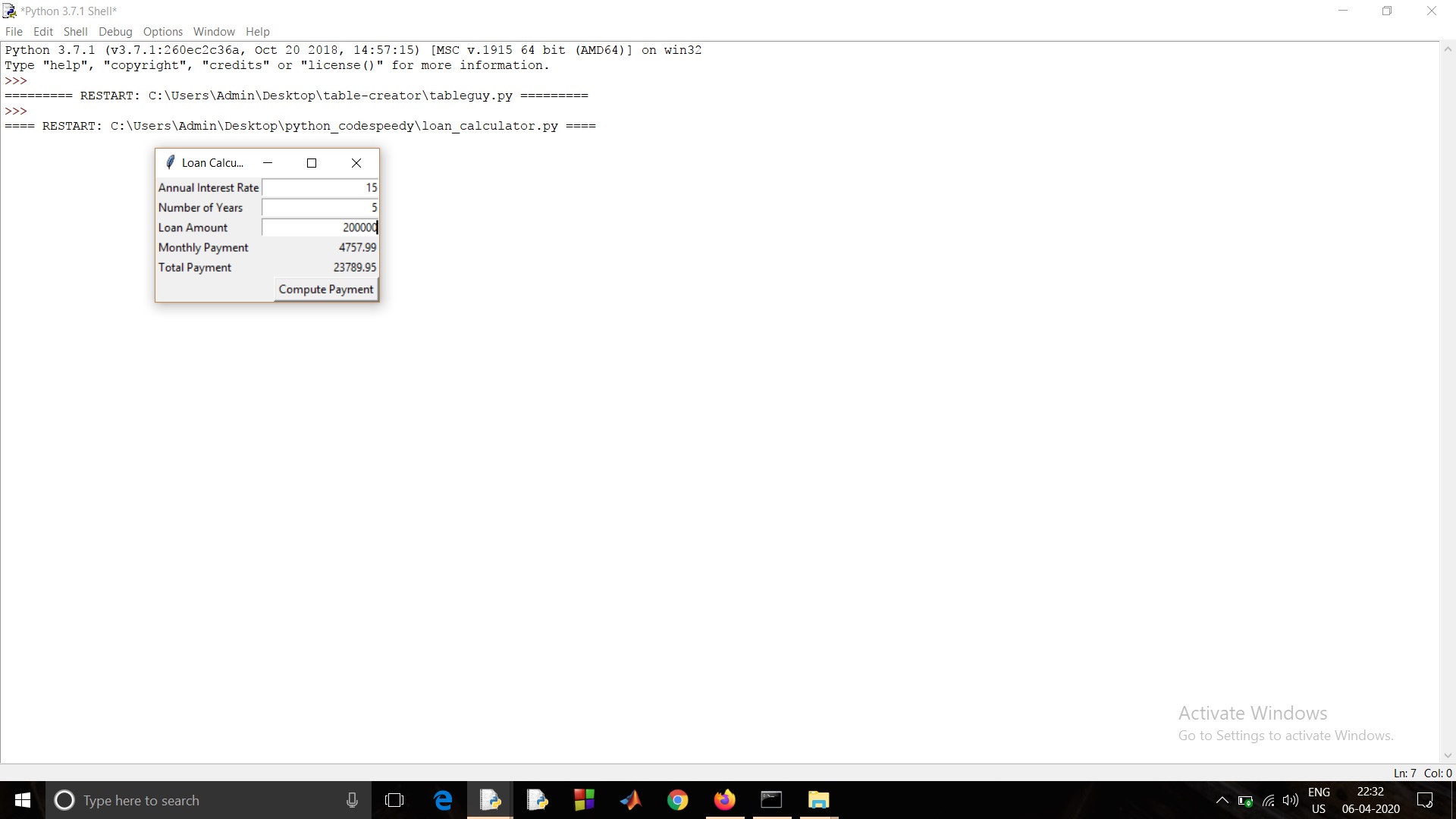
- The main function of the constructor is to create the GUI table and accept values from the user.
- The computePayment method accepts values from the init method and calculates the loan of the user based on the values it received.
- The getMonthlyPayment method calculates the monthly payment required to fulfill the loan taken.
Finally, we create an object of the class created.
Output:
Also read: Efficient program to calculate e^x in Python
Leave a Reply