Perpendicular (⟂, ⫫) and Not Perpendicular (⟂̸) symbol in LaTeX
 By Parvez Akhtar Pasha
In this tutorial, I will show you how to get Perpendicular, Double Perpendicular, and Not Perpendicular symbols in a LaTeX document.
The following table lists the default commands and output of these symbols. take a look.
| Name | Command | Output |
|---|---|---|
| Perpendicular | \perp |
 |
| Not Perpendicular | \not\perp |
 |
| Double Perpendicular | \perp\!\!\!\!\perp |
 |
\documentclass{article}
\begin{document}

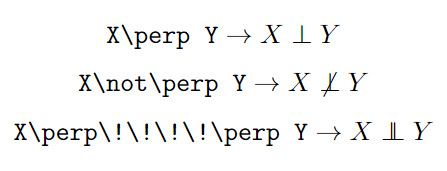
  $$\verb|X\perp Y| \rightarrow X\perp Y$$
  $$\verb|X\not\perp Y| \rightarrow X\not\perp Y$$
  $$\verb|X\perp\!\!\!\!\perp Y| \rightarrow X\perp\!\!\!\!\perp Y$$

\end{document}
Output:
Not Perpendicular with other packages
A lot of packages provide commands to get different styles of Not Perpendicular symbols.
| Package | Command | Output |
|---|---|---|
| None | \not\perp |
 |
MnSymbol |
\nperp |
 |
MnSymbol |
\not\perp |
 |
mathabx |
\notperp |
 |
mathabx |
\not\perp |
 |
fdsymbol |
\nperp |
 |
fdsymbol |
\not\perp |
 |
Leave a Reply