Natural number (ℕ) symbol in LaTeX?
 By Parvez Akhtar Pasha
In this tutorial, I will show you how to get the Natural number symbol in LaTeX. This symbol has no default command, so you must use a package to get this symbol. Multiple packages provide this symbol with slightly different styles.
You can go with the \mathbb{N} command provided by amssymb package. Or follow the table to get a different style.
| Package | Command | Output |
|---|---|---|
amssymb |
$\mathbb{N}$ |
 |
txfonts |
$\mathbb{N}$ |
 |
txfonts |
$\varmathbb{N}$ |
 |
pxfonts |
$\mathbb{N}$ |
 |
bbold |
$\mathbb{N}$ |
 |
bbm |
$\mathbbmss{N}$ |
 |
dsserif |
$\mathbb{N}$ |
 |
\documentclass{article}
\usepackage{amssymb}
\begin{document}

Set of Natural number $\mathbb{N}$:

$\mathbb{N} = \{1,2,3,\dots \}$

\end{document}
Output:
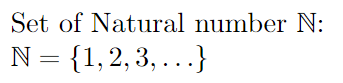
Natural number symbol in text mode
In order to get the natural number symbol in text mode, you have to create a \newcommand. Like this.
\newcommand{\textN}{\ensuremath{\mathbb{N}\;}}
Here, the \ensuremath makes the new command workable in both math and text mode. and \; leave a small space at the end of ℕ.
\documentclass{article}
\usepackage{amssymb}
\newcommand{\textN}{\ensuremath{\mathbb{N}\;}}
\begin{document}

Set of Natural number \textN:

$\textN = \{1,2,3,\dots \}$

\end{document}
Output:

Leave a Reply