How to find the n-th node of the Inorder Traversal of a Binary Tree in C++
 By Karun Thannickal
In this tutorial, we will learn how to find the n-th node of the inorder traversal of a Binary Tree in C++.
First, we will quickly recap what inorder traversal of a Binary Tree is.
Then we shall look at how displaying the n-th node of the traversal is different from traversing the entire tree.
Finally, we look at the C++ code to implement this.
Inorder traversal of a Binary Tree in C++
Examples of Linear data structures include stacks and queues. Such data structures are usually traversed in one direction. A Binary Tree is a well-known example of a non-linear data structure. Every element in a Binary Tree is also referred to as a node. A node in a Binary tree contains some data. Apart from this it also points to at most 2 nodes (called children). They are known as the left child and right child respectively. The following image shows a Binary Tree and we will refer to this example throughout this tutorial.

The 2 most common approaches to traversing a tree are Breadth-First Searching (BFS) and Depth First Searching (DFS).
Inorder traversal is a DFS approach. The algorithm for Inorder traversal is as follows.
- Traverse the left sub-tree.
- Access the data of the current node.
- Traverse the right sub-tree.
If we display the data in the nodes of the Binary Tree shown in the above image we get

This article has more on Binary Tree Traversals in C++.
Finding the n-th node
In the usual Inorder traversal of a Binary Tree, the entire tree is accessed. That is, we go through all the nodes of the tree. Our problem in this tutorial is to display the n-th node of a given Binary Tree.
Consider the Binary Tree shown above. If, say, n is 4, we are required to output only ’12’.
There are 2 simple ways to implement this both having the same idea.
- Use a static counter variable within the ‘n-th node function’.
- Use a global counter variable.
We shall look at the method with the static counter variable in this tutorial.
Algorithm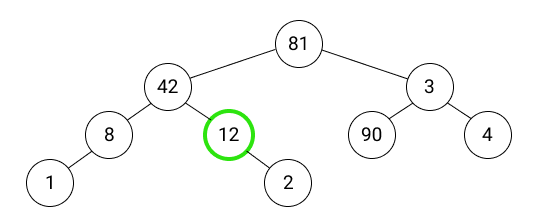
Within the function ‘nth_in_order’ that takes a node address and ‘n’ as parameters,
- Initialize static variable ‘ct’ to 0.
- Perform Inorder traversal with ‘ct’ incremented at every node.
- If ‘ct’ is equal to ‘n’, display the data in the node and return to the calling function.
Code: find the n-th node of the Inorder Traversal of a Binary Tree in C++
#include <iostream>
#include <vector>

using namespace std;

struct node //We create a node structure having
            //1 integer datatype and 2 children
{
  int data;
  node* left;
  node* right;
};

node* new_node(int d) // Function to ensure proper
                      // creation of new nodes in main()
{
  node* n;
  do
  {
    n = (node*)malloc(sizeof(node));
  } while (n == NULL); // The do-while loop ensures
                       // that n is created properly

  n->data = d;
  n->left = NULL;
  n->right = NULL;


  return n;
}


void nth_in_order(node* ptr, int n) // This function prints the n-th node
                                    // in the inorder traversal of
                                    // the created Binary Tree
{
  static int ct = 0;

  if (ptr == NULL)
    return;

  if (ct <= n)
  {
    nth_in_order(ptr->left, n);

    ct++;

    if (ct == n)
    {
      cout << ptr->data << " ";
      return;
    }


    nth_in_order(ptr->right, n);
  }

}


int main()
{
  node* root = new_node(81);
  root->left = new_node(42);
  root->left->left = new_node(8);
  root->left->left->left = new_node(1);
  root->left->right = new_node(12);
  root->left->right->right = new_node(2);
  root->right = new_node(3);
  root->right->left = new_node(90);
  root->right->right = new_node(4); // I have created the same
                                    // Binary tree as given in the
                                    // examples in the tutorial

  int n;
  cin >> n;

  nth_in_order(root, n);

  return 0;
}
Example Input
4
Example Output
12
Conclusion
In this tutorial, we have seen how to display the n-th node in the inorder traversal of a Binary Tree using C++.
Note: We have assumed that the user enters a valid value for ‘n’.
You can also learn about a more efficient traversal here.
Morris Inorder Tree Traversal in C++
Leave a Reply