Play Video in C++
 By Pritam Hande
In this tutorial, we will learn how to play any video in C++ using OpenCV. For doing so we are going to use OpenCV. Before proceeding further let’s see some basic information related to the topic.
Video: Video is basically a sequence of fast-moving images or frames. It can be of different formats like .mp4, .mkv, .webm, .avi, .flv, .3gp and many more.
Frame Rate: Frame rate is a frequency at which frames of a video are projected or displayed.
Suppose a video is being displayed at 30fps then it means 30 frames of that video are being displayed per second.
Note for implementation:
- OpenCV C++ must be installed and linked to Visual Studio on your PC. (if you don’t know how to do it then click here.)
- If the video file that you want to play is in the directory of the project then just enter the name of a file with extension otherwise enter the full path of the file while entering the name of the video file in the below program.
Program to Play Video in C++
#include<opencv2/opencv.hpp>
#include<iostream>

using namespace std;
using namespace cv;

int main()
{

  VideoCapture cap;
  Mat frame;
  string file;

  /* Enter the path of a file if the file is not in the directory of the project */
  cout<<"\nEnter name of a video file with extension: ";

  /* cin function cannot read space. Hence we have used getline function here. */
  getline(cin, file);

  cout<<"\n\n";

  /* open function is used to open the file */
  cap.open(file);

  /* Checking if the video file successfully opened. */
  if (cap.isOpened() == 0)
  {
    cout<< "\nError..!!\n";
    cout<<"\nMake sure=>";
    cout<<"\n1. Desired video file is in the folder of the project";
    cout<<"\n2. You have mentioned the extension of the file\n\n";
    exit(0);
  }

  /* Playing video as per mentioned frame rate */
  while (cap.read(frame))
  {

    /* You can process frame as per your requirement */

    /* namedWindow() is used to create a window with the mentioned name. In our case, window name is 'Playing video' */
		namedWindow("Playing video", WINDOW_AUTOSIZE);

    /* Imshow function is used to display an image and a video is basically sequence of fast moving images */
    imshow("Playing video", frame);

    /* Press esc to exit */
    if (waitKey(100) == 27)
    {
      break;
    }

  }

  /* when everything done, release the video capture object */
  cap.release();

  /* Closing all the frames after playing whole video */
  destroyAllWindows();

  return 0;

}
Input/Output:
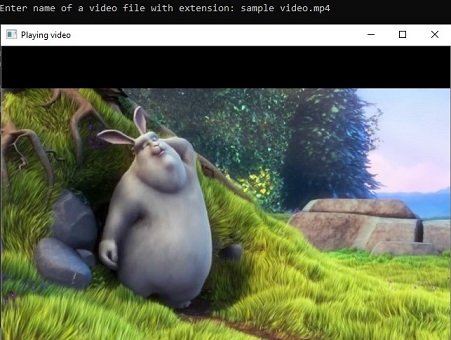
This is how we can play video in C++ using OpenCV.
You may also read:
Leave a Reply